
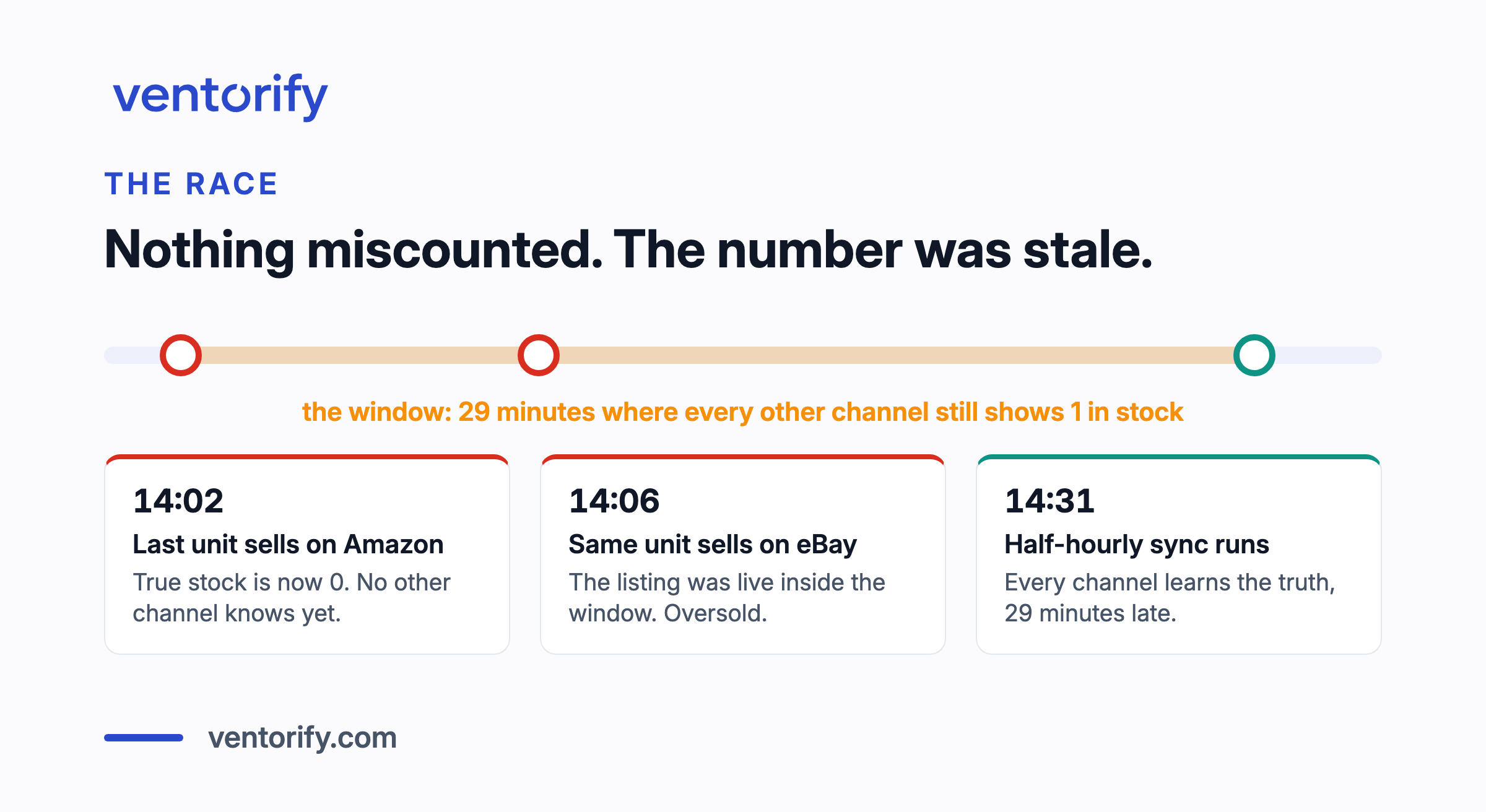
At 14:02 someone buys the last Ceramic Mug on Amazon. At 14:06 someone buys the same mug on eBay. Neither order is a mistake, neither system is wrong, and one of those customers is not getting a mug.
That is overselling, and the first thing worth knowing about it is that nothing miscounted. Every channel keeps its own copy of your stock, and a sale on one channel is invisible to the others until something carries the news across. Overselling lives entirely inside that gap. The second thing worth knowing is what an oversold order costs, because on a marketplace it is not just an apology. It is a scored event on an account you need to keep healthy.
This guide covers both, and then the three decisions that actually close the gap: how stock is shown to your channels, how much of it you hold back, and how fast news travels between them. Ventorify is an inventory app and this is its blog, so you should know the shape of the page: the method comes first, the last section says where the product fits, and nothing before it is a pitch.
Key Takeaways
- Overselling is a timing problem, not a counting problem. Two channels sell the same last unit during the window before a stock update lands, so the fix is shrinking the window and buffering the demand that fits inside it.
- An oversold order is a scored event. On eBay, a cancellation because an item is out of stock is a transaction defect, and on Amazon, cancellations count against a published ceiling. Both marketplaces document the thresholds.
- Splitting stock between channels does not stop overselling, it makes each channel run out sooner. Show every channel the full pool minus a buffer instead.
- Size the buffer from demand, not from a guess. It has to cover what the SKU sells during the longest realistic sync gap, which is why fast sellers want a buffer in days of demand and slow movers can hold a fixed unit or two.
- Stock a marketplace fulfils for you is a separate pool. It belongs in your planning view, not in your buffer math.
- No tool earns the right to write to live stock untested. Watch what it would have done first, then let it write.
Overselling is a race, not a counting error
Overselling happens when two channels sell the same unit during the window before a stock update lands. The count was never wrong. It was stale.
Walk through the mug once. One unit left. The Amazon sale lands at 14:02, and from that moment the true stock is zero, but eBay does not know yet. If your channels are connected by a sync that runs every half hour, eBay finds out at 14:31. The eBay sale at 14:06 fell into a 29 minute window where a listing was live for a unit that no longer existed. Nothing failed. The window was simply open, and a buyer walked through it.
The race is the dramatic version. The quiet version is drift, where two channels' counts diverge slowly and stay wrong for days: a manual correction made on one channel and not the others, a return restocked in one place only, a missed notification, a marketplace redelivering the same event so one sale is counted twice. A drifted count oversells eventually, but it also does quieter damage first, because every decision you make reads a number that is not true. Drift is the same disease as the race, staleness, at a different speed.
One tempting response is to check more often, and it helps less than it sounds. Polling shrinks the window; it never closes it. However short the interval, a sale can land at its start, and a fast SKU will eventually find the gap. The durable fix is event-driven updates to make the window small, plus a buffer to absorb what still fits inside it. The rest of this page is about those two levers, and about the one decision upstream of both.
What an oversold order actually costs
On your own storefront, an oversell costs an apology, a refund and some goodwill. On a marketplace, it is a metric with your name on it, measured against thresholds the marketplace publishes.
Start with eBay. eBay counts a transaction defect when, in its own wording, the seller cancels an order "because it was out of stock, or because they sold it to someone else" (eBay seller standards policy). The minimum standard is a defect rate of no more than 2% of transactions. Top Rated status requires no more than 0.5%, associated with no more than 3 different buyers. And the evaluation window is longer than most sellers expect: sell fewer than 400 items in three months and eBay evaluates your last 12 months of transactions, every month, on the 20th.
Now the arithmetic, because the percentages sound comfortable until you run them. A shop doing 50 orders a month has roughly 600 transactions in that 12 month window. Half a percent of 600 is three orders. Three out-of-stock cancellations, spread over a whole year, and you are standing on the Top Rated line; more than that, or defects spread across more than three buyers, and it is gone until the incidents age out of the window. An oversell is not a bad afternoon. On a small account it is a measurable fraction of your annual error budget, spent on one stale number.
Amazon runs the same logic under different names. Cancelling an order before shipment because you cannot fulfil it counts into the cancellation rate, which Amazon measures over a rolling 7 days on seller-fulfilled orders, with published guidance to keep it below 2.5% to prevent deactivation. The order defect rate carries a 1% ceiling over a 60 day window, and the late shipment rate a 4% ceiling (Amazon seller policies). The 7 day window deserves a second look: a burst of oversells in one bad weekend, the exact signature of a sync failure on a busy SKU, lands entirely inside a single measurement period. A problem that would be noise across a year can threaten seller-fulfilled offers in a week.
Set against all that, consider what a buffer costs you. Holding a few units back means a channel shows slightly less stock, which costs a sale only in the narrow case where demand reached into the buffered band before you restocked. The two risks are not symmetric: the buffer's cost is occasional and small, the oversell's cost is persistent and scored. Cheap insurance against an expensive event that stays on your record. That asymmetry is the entire case for the next two sections.
Show every channel the full pool, minus a buffer
The most common overselling advice for multichannel sellers is to split stock: give Amazon 40, Shopify 30, eBay 20, keep 10 in reserve. If everything ships from the same shelf, that advice trades your problem for three worse ones.
Splitting does not remove the race. It relocates it, one race per allocation, and each allocation runs out sooner because it is smaller. A channel that sells through its share stops selling while the shelf still holds units, which is a stockout you chose. Then comes the standing chore: velocities shift, one channel has a loud week, and you are moving paper stock between buckets to chase demand you could have simply served. The deeper cost is statistical rather than operational: three small pools are individually more volatile than one big one, so the same availability now needs more total stock. That is the pooling result, and we walk through the mathematics and its source in the forecasting pillar's safety stock section. Carving up the shelf throws that benefit away on purpose.
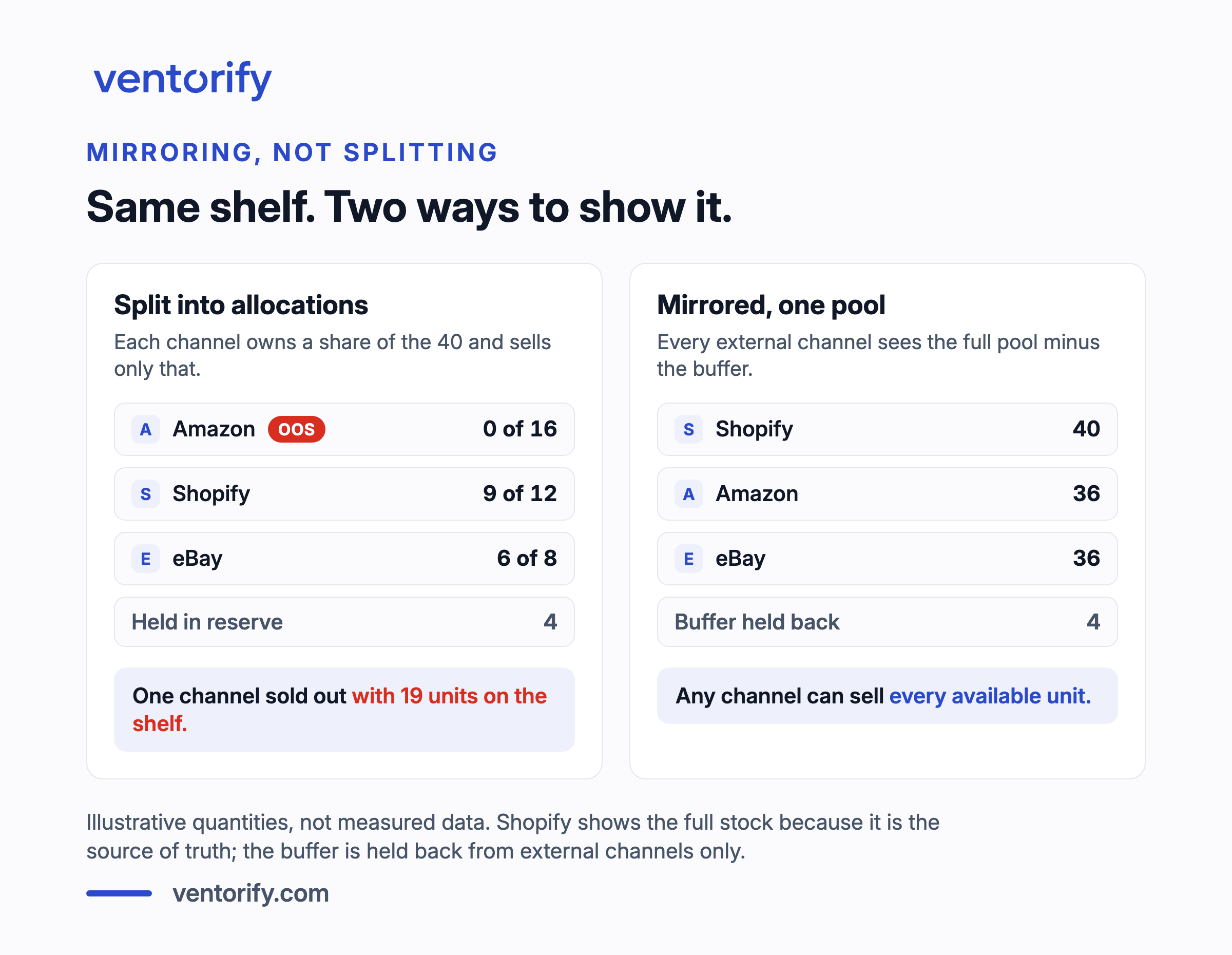
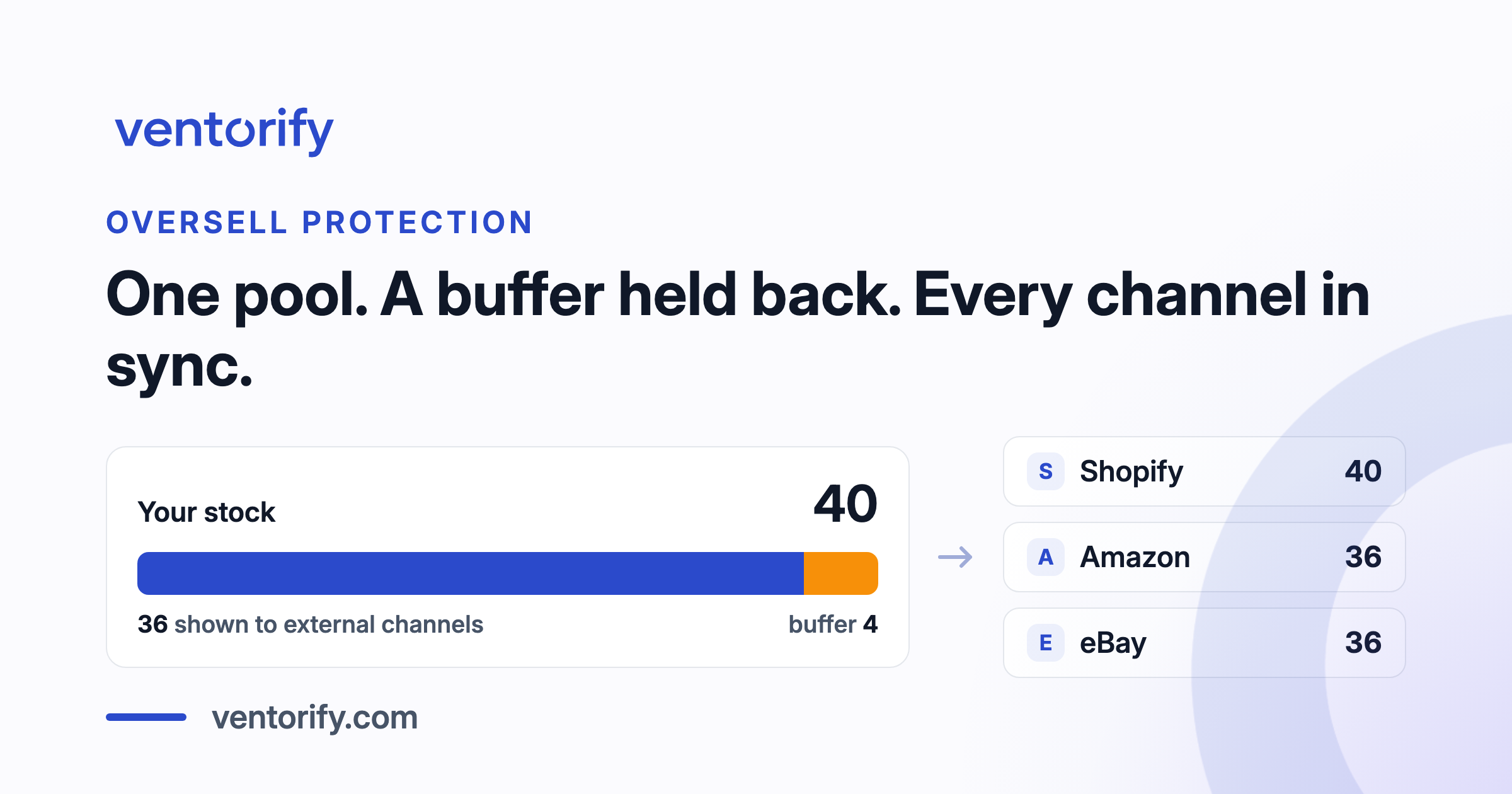
The alternative is mirroring: every external channel is shown the same number, the full available stock minus a held-back buffer. No channel owns units. Any channel can sell the last available unit, and the buffer absorbs the timing risk of two of them trying at once. This is how Ventorify works by design, and we chose it over splitting precisely because one pool serves every channel's variability at once; the buffer is held back from external channels only, while Shopify, as the source of truth, always shows the full stock.
Mirroring still leaves room for judgment at the edges. A per-channel maximum is a ceiling on what one channel is shown, and it earns its place when you have a specific reason to limit exposure somewhere: a channel with painful fees on cancellations, a listing you are winding down, a marketplace you are still learning to trust. A cap is not an allocation. The capped channel does not own the units it displays, it is just prevented from advertising all of them. When splitting is genuinely right, and it exists, mostly when stock is physically separated, is an argument we will make in full in a dedicated piece on mirroring versus splitting.
Size the buffer from velocity and the sync window
The buffer exists to absorb the sales that land inside the sync window, so its size follows from two things you can actually reason about: how fast the SKU sells across all channels combined, and how long the window can realistically stay open. Not from a percentage pulled from the air.
The logic in one line: if news of a sale takes at most half an hour to reach every channel, the buffer must cover what the SKU sells in half an hour, with margin for two channels hitting the same minutes. For almost any SKU that works out to very little, which is the secret of buffers: they are small when sync is fast. They only balloon when the window is long.
That logic produces two formulations, and the difference between them is what velocity does over time.
A fixed buffer holds back a set number of units. For a slow mover it is the right tool, because one or two units cover any plausible window at that pace, and a buffer that never changes is easy to understand and audit. Its failure mode is that it is sized once, against the velocity of the week you configured it. The mug that sold 1 a day in January and sells 5 a day before Christmas is protected by a January number in December, exactly when the race is busiest.
A buffer in days of demand holds back the units the SKU sells in a chosen span, computed from its measured cross-channel velocity. Half a day of demand on the mug selling 4.3 a day across three channels is roughly 2 units; when December lifts the velocity, the same setting holds back more units without anyone touching it, and when January returns it lets them go. The buffer follows the risk, because the risk was always proportional to velocity. What this quietly requires is a measured combined velocity per SKU, which is the same series the forecasting work is built on, and it is why buffer sizing gets more precise once demand is measured properly.
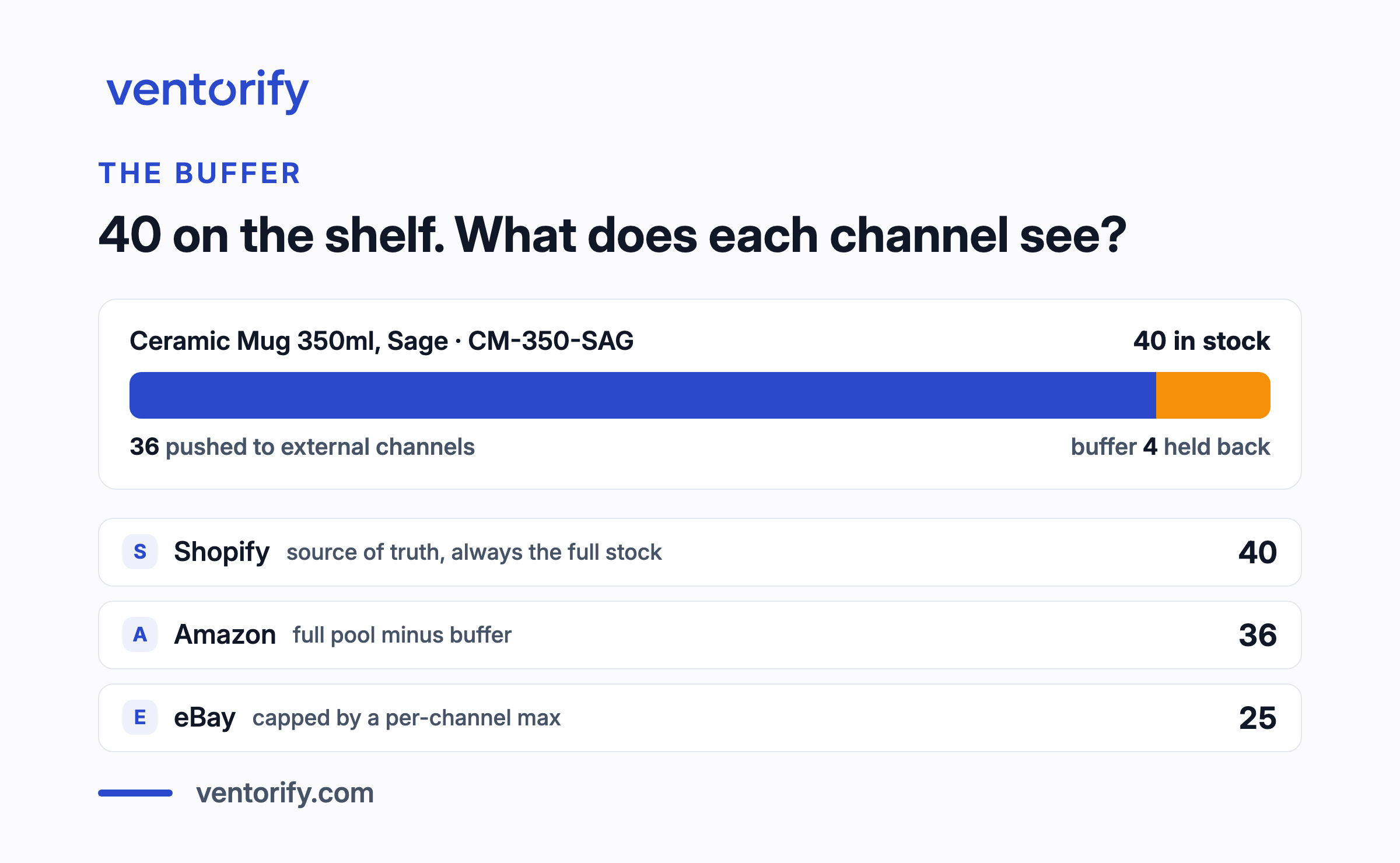
A worked example with the numbers above, chosen round for the arithmetic. The shelf holds 40 mugs. A buffer of 4, roughly a day of combined demand, is held back, so every external channel is shown 36. One channel carries a per-channel max of 25, so it shows 25 while the others show 36. A sale anywhere moves every channel's number on the next update; the 4 held back are the units that make the worst-case coincidence boring. How to pick between fixed and days of demand per SKU, and how each one fails, deserves and will get its own guide.
How fast does sync need to be
Fast enough that the buffer you are willing to hold covers what sells in the gap. Speed and buffer are one budget spent from two pockets, which is why neither number means anything alone.
Three regimes cover essentially every setup a merchant actually runs:
| How updates travel | Typical window | What it asks of the buffer |
|---|---|---|
| Manual edits on each channel | Hours to days | A day or more of demand per SKU, and discipline you have to sustain |
| Scheduled batch sync | Minutes to hours | Demand over the schedule interval, so the interval is the buffer |
| Event-driven sync | Seconds to minutes | The coincidence case: a fixed unit or two, or a small days-of-demand setting |
Run the mug through each row. At 4.3 units a day, updating channels once a day by hand means routinely carrying 5 or more units of buffer per SKU just to stay safe, which on a wide catalogue is real money sitting still. An hourly batch needs a fraction of a unit on average, but bursts are not average, so in practice you hold 1 or 2. Event-driven sync shrinks the window to the marketplace's own notification and write latency, which no tool can drive to zero, and honest ones say so; the residual buffer is the small one that covers two buyers finding the same minute. The point of the table is not that faster is better, which is obvious, but that the reader can now price the trade in their own numbers: every hour of window you remove is buffer you no longer hold, multiplied across every SKU you sell.
Stock someone else fulfils is not your pool
Everything above applies to stock you ship from your own shelf. Units sitting in a marketplace's fulfilment network are a different thing, and the worst mistake in this corner is letting either pool's numbers write over the other.
Amazon is the worked example. A SKU you fulfil yourself, FBM, sells from your shelf: it participates in mirroring, it is covered by your buffer, and an FBM sale should adjust every other channel. The same SKU stocked in FBA is fulfilled by Amazon from Amazon's warehouse. Those units cannot cover an eBay order, and your shelf cannot cover an FBA order, so they are two pools with separate replenishment questions. Ventorify displays FBA quantities alongside your own stock so the planning picture is complete, and never writes to them, because Amazon manages that fulfilment. The general rule extends past Amazon: any stock a channel fulfils for you belongs in your planning view and outside your sync and buffer math.
The practical trap is the SKU that sells both ways. Whether a given listing draws on your shelf or on the fulfilment network decides which pool the sale belongs to, so per-SKU fulfilment mode is worth getting right during setup rather than discovering during an oversell. The full Amazon picture, FBM and FBA in one stock view, is spoke territory we will cover on its own.
More locations, same race
Multiple Shopify locations change the arithmetic, not the logic. What an external channel should be shown is the stock you can actually sell, summed across locations, minus the buffer. The race behaves exactly as before; there is simply more addition on one side of it.
Two local failure modes are worth naming. The first is a location that holds units you cannot really sell, a returns pile awaiting inspection, a back room of damaged stock, quietly inflating the sum and advertising stock that is not sellable, which is drift with a postcode. The second is transfers: units moving between locations exist in a state where careless bookkeeping counts them twice or not at all, and either error flows straight into what your channels display. Accurate per-location counts are also what make derived numbers trustworthy further up, bundle stock computed per location among them.
Prove it works before you let it write
Whatever you adopt to fix overselling will be writing to the live stock that runs your business. That is the actual adoption question, not the feature list: can you watch it be right before you let it act?
There is a concrete standard to hold any tool to, ours included. An observation period should be shop-wide and read-only. Every adjustment the system would have made should be logged and exportable, so you can check its arithmetic against what actually happened in your channels, sale by sale. During observation it should write nothing anywhere, including to Shopify. And go-live should be a gate you walk through deliberately, with a checklist, not a switch that flips itself when a trial timer runs out. Ventorify's Observation Mode is built to exactly that standard, and the reason to insist on the standard is bigger than any one vendor: a sync tool asks for more trust than almost any other app a merchant installs, and the only sound way to extend that trust is to watch the tool earn it against your own sales. We give the observation workflow a full article of its own.
Frequently asked questions
What causes overselling when you sell on more than one channel?
Stale counts. Every channel keeps its own copy of your stock, a sale on one channel is invisible to the others until an update lands, and two channels can sell the same unit inside that window. The slower version is drift, where counts diverge over days through manual edits, returns restocked in one place, or events counted twice, and the oversell arrives later on a number that had been wrong for a while.
How big should a stock buffer be?
Big enough to cover what the SKU sells, across all channels combined, during the longest realistic gap between a sale and the update reaching every other channel, with margin for two channels hitting the same window. For slow movers that is a fixed unit or two. For anything selling daily, set it in days of demand so it scales with measured velocity instead of the velocity of the week you configured it.
Should I split my inventory between channels?
Not if everything ships from the same shelf. Fixed allocations make each channel run out sooner, strand units behind channels that are not selling, and add a rebalancing chore, all without removing the race. Show every channel the full pool minus a buffer, and use a per-channel maximum only where you have a specific reason to cap one channel's exposure.
Does Shopify prevent overselling by itself?
Within its own walls, largely: with inventory tracking on, Shopify stops the online store from selling below zero unless you enable "Continue selling when out of stock" for a variant, which is exactly the setting to leave off unless you knowingly take backorders (Shopify Help Center). What Shopify cannot do alone is see a sale on a marketplace it is not connected to, and that blindness is where multichannel overselling actually starts.
What happens if I oversell on Amazon or eBay?
On eBay, cancelling because the item is out of stock is a transaction defect; the minimum standard allows no more than 2% of transactions with defects, Top Rated allows no more than 0.5%, and small sellers are evaluated over their last 12 months of transactions. On Amazon, pre-shipment cancellations count into a cancellation rate with published guidance to stay below 2.5% over a rolling 7 days, and order defects against a 1% ceiling, with deactivation of seller-fulfilled offers as the documented risk of crossing them.
I just oversold an order. What should I do?
Cancel and tell the buyer quickly. A prompt cancellation is cheaper, on every marketplace's scorecard and in the buyer's memory, than a shipment that never comes. Then treat the incident as a measurement: find the gap this order fell through, a sync that was too slow, a buffer that was zero, a drifted count, and fix that gap. An oversell that happened once at today's volume happens weekly at twice the volume.
Where this leaves you
Three decisions stop overselling. Mirror the pool instead of splitting it, so every channel can sell what is genuinely available. Hold back a buffer sized from combined velocity and the sync window, so coincidence stays boring. Shrink the window with event-driven sync, so the buffer can be small.
If you sell on two channels and ship a handful of orders a day, you can run all three by hand: mirror the counts yourself, hold a generous fixed buffer, update the moment anything sells, and check the numbers against each other weekly. That works, and plenty of shops run this way longer than the software industry likes to admit. What breaks it is growth, because the blind window stops being empty: more orders per day and more channels mean more sales landing inside whatever gap your routine leaves, and the manual version of "event-driven" is you, at a laptop, every hour you are awake.
That is the honest boundary between the method and a product. Ventorify's oversell protection is the three decisions above, running continuously: mirrored stock with buffers in either mode, per-channel caps, and an alert when stock goes negative anywhere, on top of a sync layer that detects sales in seconds.