
Most of what you will read about this comparison was written in February or March 2026, when Shopify's native inventory tooling looked considerably thinner than it does today. Between then and now Shopify shipped a significant change: purchase orders now create linked inventory transfers, with CSV import, partial shipments and auto-filled costs. The native tools in August 2026 are not the native tools those posts describe.
That matters because the question you are actually trying to answer is simple: do I need to pay for something, or is what Shopify now gives me enough? Every result on the page is written by someone selling the answer. This one is too, and the last section says where Ventorify fits, so you know the shape before you invest. The first seven sections are the map.
Key Takeaways
- Shopify's native inventory replaced more of Stocky than most 2026 comparison posts admit. Since June 22, 2026, purchase orders create linked transfers, import line items by CSV, and auto-fill costs from previous orders.
- Suppliers, payment terms, supplier currencies, bin locations, adjustment reasons and ABC analysis are all native now.
- You cannot email a purchase order from the Shopify admin. Shopify's own documentation says to download it as a PDF.
- Shopify's documented answer to demand forecasting is Sidekick plus minimum and maximum thresholds set through custom metafield definitions. There is no automatic per-SKU reorder point, safety stock, or service level.
- Structured stock counting runs through Quick count in the Shopify POS app. Without POS, counting means manual or bulk adjustment in the admin.
- None of it sees your marketplaces. Native inventory covers Shopify locations only, so demand from external channels like Amazon and eBay is not in the picture at all.
What Shopify's native inventory actually does in August 2026
Start with what works, because the gaps only land if you believe this part.
Since a June 22, 2026 changelog entry, purchase orders and transfers are connected. When you are ready to receive a purchase order, it creates an inventory transfer. That transfer can have multiple shipments for partial deliveries, each tracking what was received and what is still outstanding, and can be received from the admin or from Shopify POS. Purchase orders auto-populate with previous purchase prices or the cost per item from the product page, and line items can be imported by CSV.
Supplier records hold contact details, payment terms such as Cash on delivery, Payment on receipt or Net 30, and supplier currencies. You can assign suppliers to purchase orders and maintain their records in your Shopify admin (Shopify Help Center).
Beyond purchase orders and suppliers: bin locations per variant via the bulk editor or a CSV file. Preset reasons on manual adjustments. Transfer lists you can filter by status and location. Quick count on POS with barcode scanning. A purchase order list you can search, filter, sort and export, including product mix analysis with class A, B and C inventory analysis.
That is a materially different Shopify from the one the February guides reviewed, and for a single-channel Shopify business whose Stocky use was ordering stock and keeping counts straight, it very likely covers you.
Every Stocky job, and where it lands
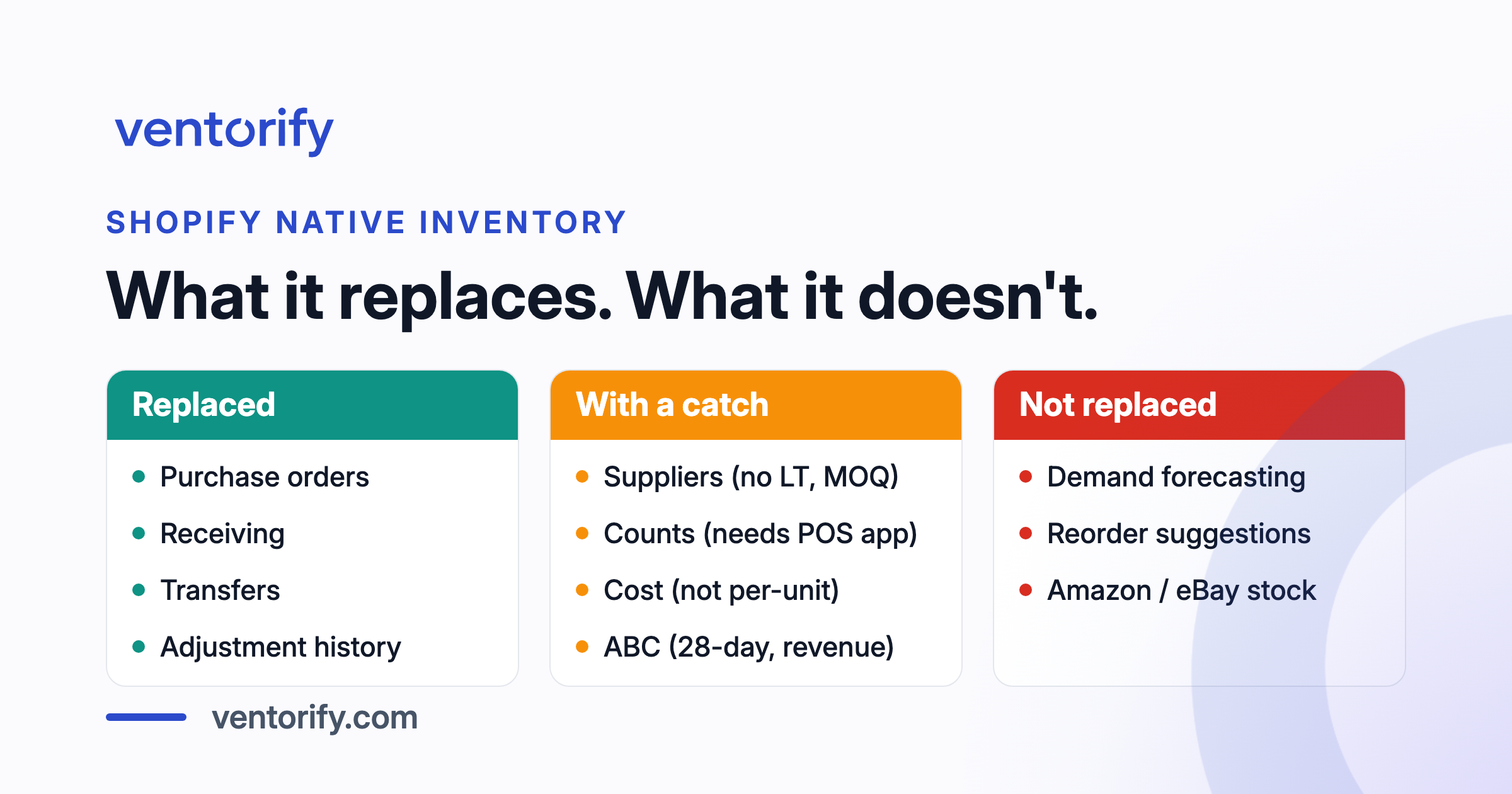
One table. Three verdicts: replaced, replaced with a catch, not replaced.
| Stocky job | In Shopify now | Catch |
|---|---|---|
| Purchase orders | Yes. Draft, then Ordered, linked transfer on receiving | Cannot email to supplier; download as PDF |
| Receiving and partial deliveries | Yes. Multiple shipments per transfer, admin or POS | None; this is a genuine improvement on Stocky |
| Suppliers | Yes. Contact, payment terms, currency | No lead time, no minimum order quantity, no pack size |
| Transfers between locations | Yes. Native transfer system, split shipments | None |
| Stocktakes and inventory counts | Yes. Quick count on POS, bulk and manual in admin | Structured counting needs the POS app; 1,000 variants per session |
| Adjustment history | Yes. Adjustment changes report, preset reasons | None |
| ABC analysis | Yes. A/B/C in purchase order product mix and inventory reports | Revenue-based, 28-day window, fixed 80/15/5 thresholds |
| Cost and margin reporting | Partial. Month-end inventory value, adjustments on POs and shipments | Costs are recorded, but no documented per-unit landed cost allocation |
| Barcode labels | Yes. Retail Barcode Labels app | Separate app, not built into the admin |
| Min/max thresholds | Yes, as custom metafield definitions | Static values you type; not computed or updated automatically |
| Demand forecasting | No | Sidekick can answer questions; not a per-SKU forecast |
| Reorder suggestions (when, how much) | No | No reorder-by date, no safety stock, no service level |
| Historical purchase order import | No | Historical purchase orders cannot be imported into Shopify |
| Amazon, eBay or other channel stock | No | Never was in Stocky either |
The rows where the catch column is empty are the ones worth recognising. Receiving with partial deliveries is better than it was in Stocky. Transfers are native. Adjustment history is structured and searchable. If those were your Stocky jobs, the switch costs you nothing but the afternoon.
Purchase orders moved, except the part where you send one
The purchase order itself is native and more tightly connected than Stocky's was. You create one from your Shopify admin with products, quantities, costs, payment terms and supplier details. When you mark it as Ordered and you are ready to receive, it creates a linked inventory transfer. CSV line-item import and cost autofill from previous orders are genuine improvements: Stocky had neither.
The gap is at the send step. Shopify's migration documentation states it directly: "You can't email a purchase order from your Shopify admin. Download a purchase order as a PDF" (Shopify Help Center).
Stocky could email a purchase order to the supplier with an attached CSV from inside the app. That meant the audit trail of what you sent, when, to which address, lived in one place. In the native workflow it lives in your mail client, and the PDF is an attachment you manage.
This is a small, concrete regression in a daily workflow. Whether it matters depends entirely on how many suppliers you order from and how often. A merchant placing one order a month will not notice. A merchant sending fifteen purchase orders a week to different suppliers has lost a step that added up.
Suppliers exist, but check the fields you plan with
Shopify holds supplier records with contact details, payment terms and currencies, and assigns them to purchase orders. That covers who you are buying from and on what commercial terms.
The fields Stocky held for each supplier that are not in Shopify's native supplier records are lead time in days, minimum order quantity and pack size. These are not contact fields. They are the three inputs to any reorder decision: when to place the order, how many to order, and in what multiple.
Post 1 in this cluster told readers to copy those fields into a spreadsheet before the sunset for exactly this reason. Shopify's native supplier record is not designed to hold the planning data a reorder workflow needs. It holds the commercial relationship. The planning layer is what you either build manually, track in a spreadsheet, or hand to a tool that computes it for you.
Counting stock runs through the POS app
Structured counting in Shopify is Quick count, and Quick count lives in the Shopify POS app. You activate it from your admin under Sales channels > Point of Sale > Settings, then in the POS editor's Apps section, where you turn on Start quick count (Shopify Help Center).
The workflow has four stages: prepare, count, submit, reconcile. Staff scan with the device camera or a connected barcode scanner, or search products by name, and enter the on-hand quantity. Each session supports up to 1,000 variants (Shopify Help Center), so a catalogue of 3,000 variants means three sessions, planned by zone.
After counts are submitted, the admin handles reconciliation. The Inventory adjustment changes report shows what changed, by how much and who did it, and Shopify's guidance is to recount any variants with variance greater than 5%.
The thing to check before you plan around this is whether you use Shopify POS at all. A merchant counting stock in a warehouse with no POS device is looking at manual adjustment or bulk adjustment in the admin instead. Both work. Neither has barcode scanning, and neither structures the count into the prepare-count-submit-reconcile flow that stops someone adjusting live stock halfway through a count.
What Shopify records about cost, and what it does not
Shopify records extra costs in two places. On the purchase order itself you can set line costs, supplier currency, payment terms and "optional adjustments such as shipping, fees, or duties" (Shopify Help Center). Then, when you receive a shipment against that order, you can add cost adjustments to the shipment: select a type such as Shipping amount or Customs duties and enter the amount. The Cost summary on the inventory transfer aggregates all shipment adjustments, "so you can compare the agreed cost on the purchase order with the actual cost to receive the goods" (Shopify Help Center).
That gives you visibility into what a delivery actually cost. It does not, as far as Shopify's documentation describes, allocate those costs per unit or write a landed cost back to a product's cost per item. The distinction matters because margin reporting needs the per-unit number: what one unit actually cost to land, including its share of freight and duty. Without that, the cost per item on the product page stays at the purchase price, and every margin report that uses it understates cost.
Shopify's inventory reports do include Month-end inventory value, which uses the cost per item field, and ABC product analysis, which grades products as A, B or C by revenue contribution over the last 28 days, with A-grade products collectively accounting for 80% of revenue, B-grade the next 15%, and C-grade the last 5% (Shopify Help Center). Both are useful. Both rely on a cost per item that does not include freight or duty unless you update it yourself.
Demand forecasting is the gap with a name
Shopify's migration page describes two things where Stocky had forecasting. First: "Use Sidekick to help you forecast demand, identify which products need replenishing." Second: "Set custom minimum and maximum thresholds per variant using custom metafield definitions" (Shopify Help Center).
Sidekick is an AI-enabled commerce assistant in your Shopify admin that handles tasks using everyday language and presents changes for your review before applying them (Shopify Help Center). You can ask it "What should I reorder?" and it can help draft a transfer or purchase order that respects your minimum and maximum limits. That is a useful tool for a specific kind of question at a specific moment.
It is a different thing from a reorder point computed per SKU every day. A forecast needs demand variability measured from your order history, lead-time variability measured from your receiving history, a service level per SKU class that determines how much safety stock to hold, a model that handles sparse demand without pretending a product nobody bought last month is a product nobody wants, and demand history that is not corrupted by the days you were out of stock.
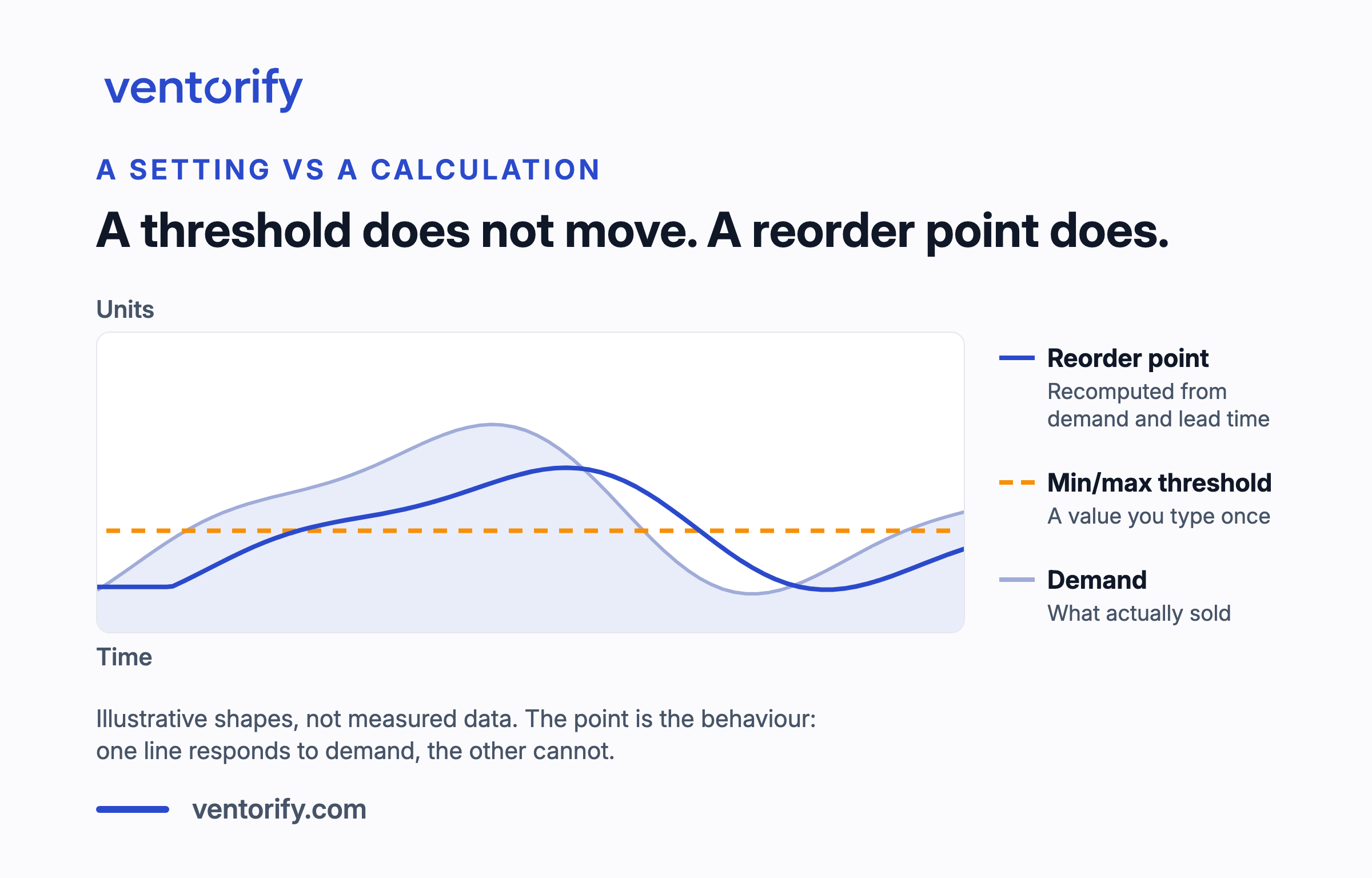
The minimum and maximum thresholds are values you type into a metafield. They do not change when demand changes. They do not account for how long your supplier takes to deliver. They are a static line that says "alert me below this, do not exceed that". A reorder point is a computed line that says "order this many by this date, given what you sell, how fast your supplier ships, and how much stockout risk you are willing to accept for this product". One is a setting. The other is a calculation.
Neither is wrong. They solve different problems at different scales. A Shopify merchant with 50 SKUs and stable demand can maintain thresholds by hand. A merchant with 2,000 SKUs across seasonal and intermittent sellers cannot.
None of it sees your marketplaces
Everything above manages stock across your Shopify locations. Stock on marketplaces like Amazon and eBay, and the demand those channels generate, are not in scope for Shopify's native inventory tooling.
This is not a criticism. Shopify is a commerce platform, not a marketplace aggregator, and its inventory tools are designed for the stock that flows through Shopify. But for a merchant whose Shopify store is 60% of total demand, a reorder decision made on native data is a reorder decision made on 60% of the signal. The other 40% is in a different admin, counted separately, fluctuating on its own schedule.
That was equally true of Stocky. Stocky never saw marketplace demand either. So this is not a regression from the sunset. It is a gap that has never been filled by either tool, and it is the gap that matters most to a multichannel merchant, because every other row in the table above has an answer, and this one does not.
Frequently asked questions
Does Shopify have demand forecasting built in?
Not as an automatic per-SKU calculation. Shopify's documented approach is to ask Sidekick questions like "What should I reorder?" and to set minimum and maximum thresholds per variant through custom metafield definitions. Sidekick presents changes for your review before applying them. There is no native reorder point, safety stock figure or service-level calculation.
Can I create purchase orders in Shopify without an app?
Yes. Purchase orders are native in the Shopify admin. Since June 22, 2026, creating a purchase order and then receiving it creates a linked inventory transfer with partial delivery support, CSV line-item import and cost autofill.
Can Shopify email a purchase order to my supplier?
No. Shopify's migration documentation states: "You can't email a purchase order from your Shopify admin. Download a purchase order as a PDF." You send it yourself from your mail client.
Do I need Shopify POS to count stock?
For Quick count, yes. It is a POS UI extension that runs in the Shopify POS app, activated from Sales channels > Point of Sale > Settings in your admin. If you do not use Shopify POS, you can still adjust inventory manually or in bulk from the admin, but without barcode scanning or the structured count session.
Does Shopify calculate reorder points or safety stock?
Not in the native tooling. Minimum and maximum thresholds are values you set per variant through custom metafield definitions. They do not update automatically based on demand or lead time.
Does Shopify's native inventory sync stock to Amazon or eBay?
No. Native inventory manages stock across your Shopify locations. Marketplace stock, marketplace demand and marketplace sync are outside its scope.
The honest verdict, and where Ventorify fits
If you sell on Shopify only and you order from a handful of suppliers on a rhythm you already know, the native tools are probably enough and you should not buy anything. The purchase order and transfer workflow is solid, the supplier records cover the commercial relationship, and adjustment history gives you an audit trail. Check what you need against the table above before you spend.
The two things native Shopify does not do, and where Ventorify fits, are demand forecasting and multichannel stock. Ventorify computes a reorder point per SKU every day from combined demand across Shopify and every external channel you sell on, with statistical safety stock differentiated by ABC class, and it respects supplier lead time, minimum order quantity and pack size when it suggests how much to order and by when. That is how forecasting from combined channel demand works.
On the purchase order side, Ventorify sends the order to the supplier by email with a PDF and a secure link, receives with partial deliveries, and writes true landed cost per unit back to Shopify so your margin reports reflect what units actually cost to land. That is purchase orders, landed cost and lead-time learning.
If you are coming from Stocky, where each Stocky job continues in Ventorify sets out the full map. It starts in a shop-wide read-only mode where every stock adjustment it would have made is logged and nothing is written anywhere, so you can see it work before you let it write; why that order is the safe one is an argument we make in full elsewhere. Export your data first, though. That deadline does not move.